Turning Word documents into perfect PDFs, automatically
July 8, 2026 · Northlight Studio
A surprising number of businesses have one person whose week is partly eaten by the same task: open a Word template, copy in this customer's details, export a PDF, repeat. It's slow, it's error-prone, and it doesn't scale. It's also completely automatable — and I've built exactly this kind of engine.
The goal
Given some data — a customer, an order, a claim — produce a finished, on-brand PDF in a second, with zero manual steps. Multiply that by thousands of documents a month and the time savings become real money.
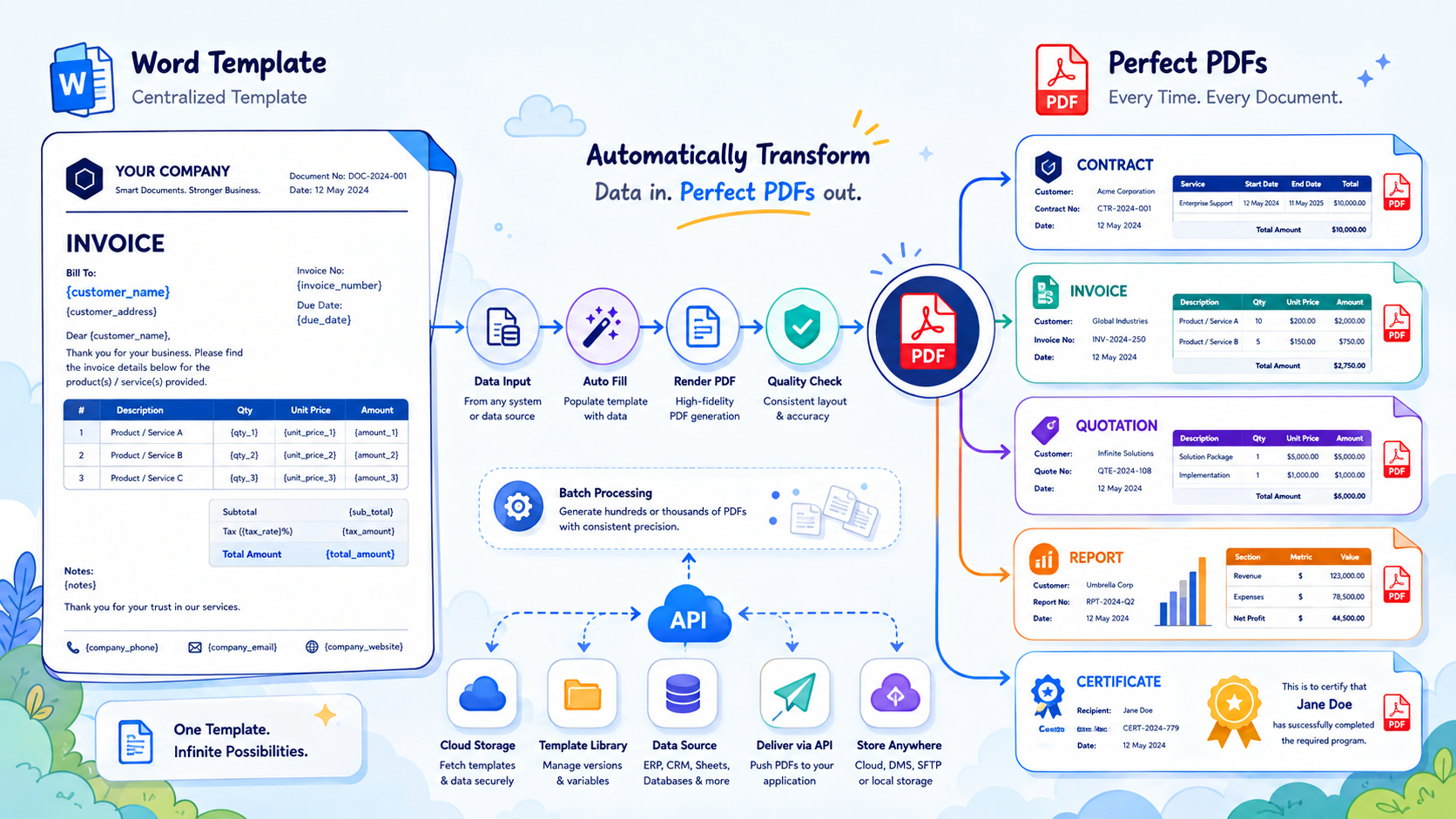
How it works, in plain terms
The trick is to separate the design of the document from the data that fills it.
1. Your team owns the template. The document starts as a normal Word file with
placeholders where the variable bits go — think {customer_name} or {total_amount}.
This matters: your non-technical team can update the wording, layout, and branding in a
tool they already know, without involving a developer. Design stays where it belongs.
2. The service fills in the blanks. When a document is needed, the system takes the template and swaps every placeholder for real data. Simple placeholders, repeating tables (line items on an invoice), conditional sections ("show this paragraph only if…") — all handled programmatically.
3. It renders a true PDF. The filled-in document is converted to PDF by the same engine that powers office software, so the output is pixel-accurate — fonts, spacing, tables and headers exactly as designed. Not an approximation; the real thing.
4. Templates live in cloud storage. Templates are stored centrally, so updating one updates every future document instantly. No redeploying software to change a footer.
The details that make it production-ready
A demo is easy; a dependable service is where the engineering lives:
- Speed and concurrency. Rendering is the slow part, so it's isolated and pooled to handle bursts — end of month, when everyone generates statements at once.
- Consistency. The same input always produces the same output, byte for byte. That predictability matters for anything legal or financial.
- Containerised. The rendering engine and all its fonts ship together in one package, so the PDF looks identical on my laptop, on the server, and in a year's time.
- An API, not an app. It's a small service other systems call. Your existing software asks for a document and gets one back — no new tool for anyone to learn.
Where this pays off
Contracts, invoices, quotes, statements, claim forms, certificates, reports — anything that follows a template and changes only in the details. If someone on your team is manually producing documents, that's a process quietly begging to be automated.
The best part: once it's built, it just runs. The person who used to spend Friday afternoons in Word gets their Friday afternoons back.